
Claude terminal themes
Choose from 907 themes for the Claude Code terminal. Each plugin adds a palette to the /theme picker and includes matching colors for your terminal app.
Browse by family or install the terminal theme pack.
Compare terminal palettes
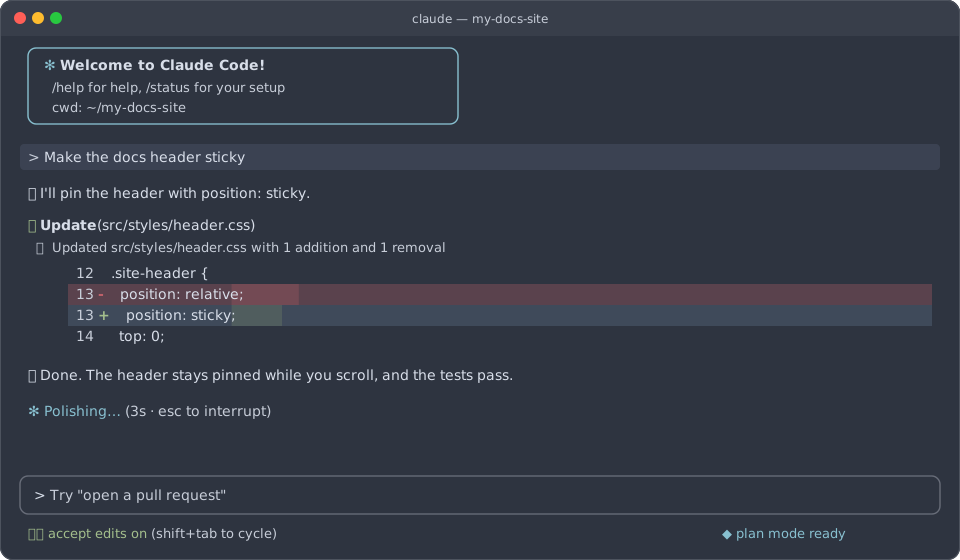 Nord
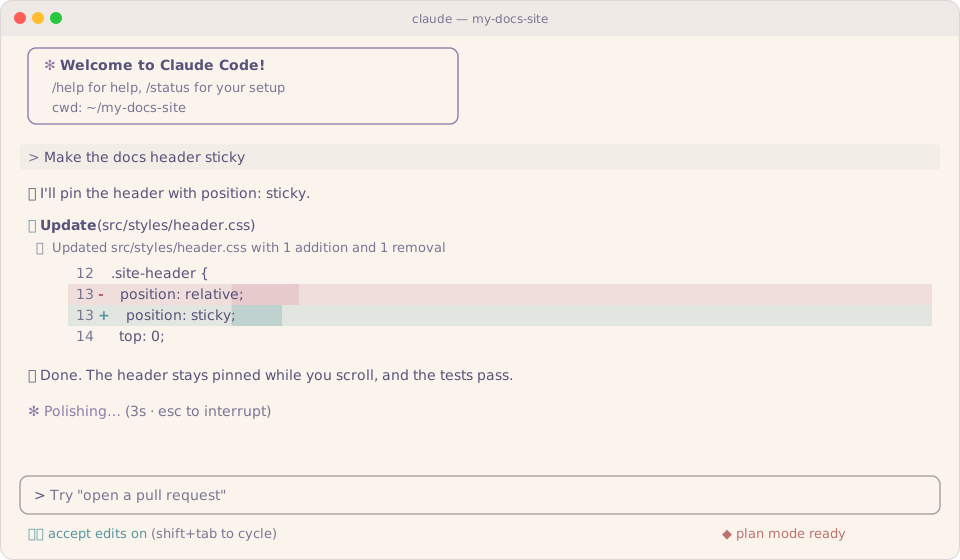 Rosé Pine Dawn
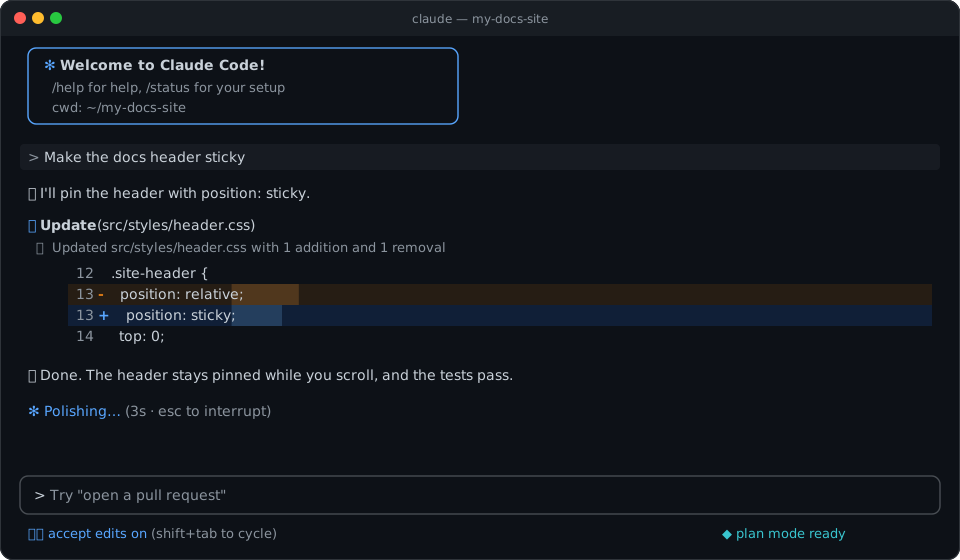 GitHub Dark Colorblind
How do I change my Claude Code terminal theme?
Install a theme plugin, run /reload-plugins in Claude Code, then open /theme and select its name. Claude Code remembers your choice for later sessions. For Nord, run this command in your shell.
claude plugin install nord --marketplace Skynettheone/claude-themesTo make all 907 palettes available in the picker, install the terminal theme pack.
claude plugin install terminal-themes --marketplace Skynettheone/claude-themesWhy does my terminal background look different?
Claude Code controls the colors of diffs, status messages, and prompts. Your terminal app sets the window background and default text. Open a theme page and follow Terminal color schemes for its Windows Terminal, iTerm2, Ghostty, kitty, Alacritty, or WezTerm file.
Browse terminal themes by family
Andromeda 1
Atom Material 1
Atom One 2
Aura 2
Cobalt Next 3
Cobalt2 1
Darcula 1
Dracula 2
Dracula At Night 1
Everforest 2
fairyfloss 1
GitHub 9
Gruvbox 6
Gruvbox Material 2
Halcyon 1
Horizon 2
Houston 1
Kanagawa 1
LaserWave 2
Monokai Night 1
Moonlight 2
Night Owl 2
Noctis 11
Nord 1
Omni 1
One Dark Pro 5
One Monokai 1
Open VSX 442
- 2077
- 90s Anime
- Abelfubu Catppuccin Contrast
- Abelfubu Everforest
- Abelfubu Greenish
- Adey Coder
- Adey Coder - Deep Dark
- Aether Coffee
- Aether Coffee Dark
- Aether Dark
- Aether Dark Space
- Aether Emerald
- Aether Light
- After Dark
- Aion
- Aion Light
- Akari Dawn
- Akari Night
- Alabaster
- AmericanDad
- Andromeda Night Dusk
- Anirak (Dark)
- Anirak (Light)
- apathy /// storm
- Apex Racer Pro Premium
- AposTheme
- Arc+
- Arc+ (Light)
- Arch Simple
- Arduino Dark
- Armada
- Atom One Half Light
- Atomize
- Aurora Nocturne
- Aurora Nocturne Soft
- ayu MiDas
- Better Selenized Dark
- Black
- Blackboard
- Blue Light Theme
- Blue Light Theme 2022
- Blueberry Banana
- BluePaint
- Brick Shinkuro
- Bubblegum Goth
- Calmppuccin Macchiato
- Calmppuccin Mocha
- Calmppuccin Oledppuccin
- Carbon Midnight Elite Premium
- Catppuccin Noctis Frappé
- Catppuccin Noctis Latte
- Catppuccin Noctis Mocha
- Celadon Theme
- Charcoal Mint
- Charcoal Mint Soft
- Cherry
- Clay Terminal
- Clay Terminal High Contrast
- Clay Terminal Light
- Clay Terminal Light High Contrast
- Codemos Modern (Light)
- CodeNebula Dark
- CodeNebula Light
- Coder Dark
- Coder Dark Sakura
- Coder Light
- Coder Light Sakura
- Codigrate Everest
- Codigrate Miami
- Codigrate Rio de Janeiro
- Codigrate Tokyo
- Coldark - Cold
- Coldark - Dark
- CommunicationBreakdown
- Cosmic Nights
- Cursor Dark
- Cursor Dark Maple
- Cursor Dark Midnight High Contrast
- Cursor Light
- Cute
- CyberSec Pro
- Darcula Stormy
- Dark (Chalice)
- Dark (Lynx Theme)
- Dark (Molokai)
- Dark Forest Theme (SM)
- Dark Galaxy Theme (SM)
- Dark JetBrains New UI Color Theme
- Dark Midnight Theme (SM)
- Dark Monochrome Theme (SM)
- Dark Ocean Theme (SM)
- Dark Sunset Theme (SM)
- dark-blue
- Deepdark Material Theme Default Version
- Demo Time Dark
- Demo Time Light
- DLUnire Dark
- Dracula At Dusk
- Dracula Colorful
- Dracula Light
- Dracula Midnight
- Draculinho
- Dynamic Base16 DankShell
- Dyno
- Eclipsa
- Eclipse Dark
- Eclipse Light
- Eclipse: Blood Moon
- Eclipse: Lunar
- Eclipse: Solar
- Edge Dark (Aura)
- Ember High Contrast (orange)
- Ember High Contrast (purple)
- Esmerald
- Esmerald Light
- ethereal
- Everforest Night Light Soft
- Evergruv (Everforest) Light
- Evergruv (Gruvbox Material) Dark
- Evro Dark
- ExcelDark
- ExcelLight
- Fleet
- Fleet Dark
- Fleet Light
- Fleet Ocean
- Fluent Oled
- Flux Daylight
- Flux Night
- Forest Mist
- Forest Mist Soft
- FullstacksJS (Dark)
- FullstacksJS (Legacy)
- FullstacksJS (Main)
- Funky Dark
- Fury (Lynx Theme)
- Genesis Dark
- Genesis Light
- Geode Amethyst
- Ghibli (Lynx Theme)
- GitHub Light Monochrome
- Gitpod Dark
- Gitpod Light
- Gleam
- Gleam Classic
- Grape Glass
- Gray Theme
- Greyburst
- Grubby
- Hack The Box
- Hack The Box-Lite
- HearthCode Ember Dark
- HearthCode Ember Light
- HearthCode Moss Dark
- HearthCode Moss Light
- Helios Theme
- Hopscotch Mono
- Huacat Pink Dark
- Huacat Pink Theme
- Hyper
- Hyper.is Theme
- Iceberg
- Iceberg Light
- Indigo Carbon HC
- ini Dark
- ini Light
- IntelliJ Light
- Islands Dark
- Islands Light
- JellyFish
- Jungle Pup Dense
- Jungle Pup Field
- Just Another Material Theme
- Just Black
- Kanagawa Lotus
- Kiro (Lynx Theme)
- Le Grand Nord
- Le Grand Nord Graphite
- Light - Android Studio
- Light (Chalice)
- Light (Lynx Theme)
- Light JetBrains New UI Color Theme
- Lilac
- Liquid (Lynx Theme)
- Lotus Dark
- Lotus Light
- Love Dark
- Love Light
- Lukin Theme
- MacOS Modern Dark - Xcode Civic
- MacOS Modern Dark - Xcode Default
- Manjaro OneDark Cool
- Maple Dark
- Maple Light
- Matcha Ceremony
- Matcha Ceremony Sakura
- Matcha Ceremony Zen
- Material Palenight Theme
- Material Theme Deepforest
- Material Theme Revived (Atom Fork)
- Matte Black
- Mayukai Dark
- Mayukai Mirage
- Mayukai Mirage Gruvbox Darktooth
- MD Reader Dark
- MD Reader Light
- Miku Code
- Miku Code - Light
- Miku Code Fusion - Light
- Moegi Dark
- Moegi Iris
- Monikai Dark
- Monikai Light
- Monokai Vibrant
- Monokai++ Unified
- monokai4d
- Monospace Dark
- Monospace Light
- Moonbloom Official Theme
- Moondust: Far Side of the Moon
- Moondust: Near Side of the Moon
- Moonokai
- Morrocoy Dark
- Morrocoy Light
- Nagi Dark
- Naviary Dark
- Naviary Light
- Naviary Pastel Dark
- Naviary Vivid Dark
- Naviary Vivid Light
- Nebula Aura Dark
- Nebula Aura Light
- Nebula Aura Midnight
- Nebula Aura Violet
- Nebula Oni (Favorite)
- Nebula Oni (Hourglass)
- Neomono
- Neomono Deep
- Neomono HC
- NextGen Terminal
- Nexus Dark (Beta)
- Nexus Theme
- Night (Lynx Theme)
- Night Coder Ash
- Night Coder Charcoal
- Night Coder Ember
- Night Sky
- Night Wolf (dark blue)
- Nightcall
- Nightcall Muted
- No Pixie Blue Dark
- No Pixie Blue Light
- No Pixie Burgundy Dark
- No Pixie Burgundy Light
- No Pixie Dark
- No Pixie Dark High Contrast
- No Pixie Light
- No Pixie Light High Contrast
- No Pixie Yellow Dark
- No Pixie Yellow Light
- NoctaliaTheme
- Noel
- Noir
- Nord Deep
- Norrsken Aurora
- Nur Dark
- Nur Light
- Nvim (Lynx Theme)
- Obsidian Dark
- Ocean Space Refined
- Office Black Theme (Word) (Experimental)
- Office Theme (PowerPoint)
- Office Theme (Word)
- oh-lucy
- One Dark 2026 Pro
- One dark Miku
- One Dark Modern
- One Dark Modern Classic
- One Dark Modern Pro
- One Dark Pro Monokai Darker
- One Hunter Flexoki Dark
- One Hunter Flexoki Light
- One Hunter Theme
- One Hunter Theme Light
- One Hunter Theme Material
- One Hunter Theme Vercel
- OpenSumi Dark
- OpenSumi Light
- Orange Flavor
- Orange Flavor (Light)
- Orbi Blue
- Orbi Green
- Orbi Red
- Oro Theme
- Oscura Midnight
- oxford-blue
- Panda Syntax
- Paper
- Pascal (Default)
- Pascal Solar
- Pastel Pink (Light Status Bar)
- Perplexity Theme
- Pierre Dark
- Pierre Dark Soft
- Pierre Light
- Pierre Light Soft
- Pink Candy Dark
- Pink Candy Dark Warm
- Pink Candy Light
- Pink Lullaby
- Pitaya smoothie
- Pittaya Dark
- Pittaya Light
- Pop Dark
- Pop Light
- Pop N' Lock Theme by Luxcium
- Pop N' Lock Theme by Luxcium Alexis's Black
- Prism
- Purply (Dark)
- Purply (Light)
- pustota
- pustota light
- Quantum Flux
- R3BL 2026 Theme
- raspberryCandy
- raspberryCandy - sugarFree
- Ravenwood Alfheim
- Ravenwood Asgard
- Ravenwood Dark
- Ravenwood GrokDay
- Ravenwood GrokNight
- Ravenwood Helheim
- Ravenwood Jotunheim
- Ravenwood Light
- Ravenwood Muspelheim
- Ravenwood Nidavellir
- Ravenwood Svartalfheim
- Ravenwood Vanaheim
- Recoil
- Retroscope
- Retroscope Amber
- Retroscope Cassette
- Retroscope High Contrast
- Retroscope Paper
- Retroscope Phosphor
- Retroscope Soft
- Rider Dark
- Rider Light
- Roveliese Dark
- Roveliese Light
- Roveliese Storm
- Roveliese Warm
- rubdoo-dark
- rubdoo-light
- Runic Minimal
- Sakura Night Saturated Theme
- santi020k dark
- santi020k hc dark
- santi020k light
- Saturated Dark Modern
- Scoria
- SeeSharp Theme - Blue
- SeeSharp Theme - Dark
- SeeSharp Theme - Grey
- SeeSharp Theme - Oceanic Dark
- SeeSharp Theme - Solarized
- SeeSharp Theme - Solarized V2
- SeeSharp Theme - Tailwind
- SeeSharp Theme-Material High Contrast
- sema
- sema light
- sema light chroma
- sema soft chroma
- Serendipity Midnight Electric
- Ship at Sea
- Simple Dark
- Simple Dark Soft
- Simple Light
- SkillAvid Pure Black
- Smoothy 7
- SpaceBox
- SpaceBox Nova
- Sphere
- Spinel Light
- Squirrelsong Light
- Srcery
- Starfall
- Steffula Code
- Stellar Dust
- Sublime VSCode Theme
- Sugar Dark
- Sugar Light
- Sunset Gradient
- Sunset Gradient Soft
- Supabase Theme
- Supabase Theme Soft
- SuperGreatMonokai
- Sweet Dracula Monokai
- Sweet vscode
- Synesthesia Synthwave
- Synthax
- Synthwave Fluoromachine (Cursor/VS Code)
- The Best Theme
- The unnamed
- Tokyo City
- Tokyo City Lighter
- Tokyo Storm Gogh
- Tomorrow Night Bright (R Classic)
- Tsoding Emacs Gruber Minimal
- Twin Black
- Twin Blue
- Tyrell Corporation
- Ultra Instinct Mastered
- Ultra Instinct Mastered (Light)
- Ultra Instinct Sign
- Umbre
- VDark
- Velvet Orchid
- Velvet Orchid Victorian
- Vercel 2024 Dark
- Vercel 2024 Light
- Vesper Light
- Vibe Black
- Vibe Black Lite
- Vibrant Ink Positron
- VLight
- Void
- Voltstrike Calm Orbit
- Voltstrike Ion Peak
- Voltstrike Storm Front
- Wal
- WebStorm Light
- WebStorm New Dark
- WordLight
- Xcode 11 Default Dark
- Xcode Classic (Dark)
- Xcode Classic (Light)
- Xcode Midnight (Dark)
- XD Theme
- YaMa theme dark
- Zed One Theme Light
- Zokugun Obsidium
Palenight 2
Plastic 1
Poimandres 2
Radical 1
Rosé Pine 3
Shades of Purple 2
Slack 6
SynthWave '84 1
Tinted Theming 337
- 0x96f
- 3024 Night
- Abyssal
- Adventure Time
- Aftertaerm
- Alucard
- Apathy
- Apprentice
- Argonaut
- Arroz con Dulce
- Arroz con Dulce Dark
- Ascendancy
- Ashes
- Atelier Cave Light
- Atelier Dune
- Atelier Dune Light
- Atelier Estuary Light
- Atelier Forest
- Atelier Forest Light
- Atelier Heath
- Atelier Heath Light
- Atelier Lakeside Light
- Atelier Plateau Light
- Atelier Savanna Light
- Atelier Seaside Light
- Atelier Sulphurpool Light
- Aztec
- Banana Blueberry
- Batman
- Berlin
- Birds Of Paradise
- Black Metal
- Black Metal (Bathory)
- Black Metal (Burzum)
- Black Metal (Dark Funeral)
- Black Metal (Immortal)
- Black Metal (Khold)
- Black Metal (Mayhem)
- Blazer
- Blue Matrix
- Blueish
- Bluloco Light
- Bogota
- boo-shnickle
- boo-shnickle-light
- Borland
- Bosque
- Brasa
- Breeze
- Brewer
- Bright
- Broadcast
- Brogrammer
- Builtin Dark
- Builtin Pastel Dark
- Builtin Solarized Dark
- Builtin Tango Dark
- Cacao
- carbonfox
- Cerulean Signal Dark
- Cerulean Signal Light
- Chalk
- Chalkboard
- Charcoal Dark
- Charcoal Light
- Chicago Day
- Chicago Night
- Chinoiserie
- Chinoiserie Midnight
- Chinoiserie Morandi
- Chinoiserie Night
- Classic Dark
- Classic Light
- Cobalt Neon
- Colors
- Corduroy
- Corduroy Dark
- Cupertino
- Cyberdyne
- Da One Black
- Da One Paper
- DanQing
- DanQing Light
- Dark Plus
- Dark Violet
- darkmoss
- dayfox
- Decaf
- deep
- Deep Oceanic Next
- Default Dark
- Default Light
- Digital Rain
- dirtysea
- duskfox
- Earthsong
- Edge Dark
- Edge Light
- Eighties
- Eldritch
- Elementary
- Embarcadero
- Embers Light
- emil
- ENCOM
- Equilibrium Dark
- Equilibrium Gray Light
- Espresso
- Espresso Libre
- Evenok Dark
- Everforest Dark Hard
- Everforest Light (Hard)
- Fideloper
- Firefox Dev
- Fish Tank
- Flatland
- Flexoki Dark
- Flexoki Light
- Floraverse
- Forest Blue
- Framer
- Front End Delight
- Fruit Soda
- Fun Forrest
- Gigavolt
- Google Dark
- Google Light
- Grayscale Dark
- Grayscale Light
- Gruber
- Gruvbox Dark Medium (Forest)
- Gruvbox dark, pale
- Gruvbox Material Dark, Hard
- Gruvbox Material Light, Hard
- Hacktober
- Hardhacker
- Harmonic16 Dark
- Harmonic16 Light
- Heetch Dark
- Heetch Light
- Helios
- Helsinki
- Highway
- Hipster Green
- Homebrew
- Humanoid dark
- Humanoid light
- iA Dark
- iA Light
- IC-Green-PPL
- IC-Orange-PPL
- Idle Toes
- IR Black
- Isotope
- Jackie Brown
- Japanesque
- Jellybeans
- Kanagawa Dragon
- Kimber
- Kissa Latte
- Kissa Macchiato
- Lab Fox
- Lahabana
- Laser
- Lichen Chartreuse Dark
- Lichen Chartreuse Light
- linux-vt
- London
- London Tube
- Lovelace
- Lumina Aurora Dark
- Lumina Aurora Light
- Lumina Canopy Dark
- Lumina Canopy Light
- Lumina Cherenkov Dark
- Lumina Cherenkov Light
- Lumina Dusk Dark
- Lumina Dusk Light
- Lumina Ember Dark
- Lumina Ember Light
- Lumina Espresso Light
- Lumina Harbor Light
- Lumina Lagoon Light
- Lumina Nebula Dark
- Lumina Nebula Light
- Lumina Olive Dark
- Lumina Oxblood Dark
- Lumina Oxblood Light
- Lumina Parchment Dark
- Lumina Polaire Light
- Lumina Quartz Dark
- Lumina Quartz Light
- Lumina Rayleigh Dark
- Lumina Vitrail Dark
- Lumina Vitrail Light
- Macintosh
- Madrid
- Materia
- Material Dark
- Material Darker
- Mathias
- Measured Dark
- Measured Light
- Medallion
- Mellow Purple
- Mexico Light
- Mezcal
- Miami
- Misterioso
- Mocha
- Molokai
- Mona Lisa
- Monokai Vivid
- Mountain
- Neovim Dark
- Neovim Light
- Night Owlish Light
- nightfox
- Noche
- Nocturnal Winter
- Nord Light
- Ocote
- One Black
- One Half Light
- One Light
- OneDark Dark
- Outrun Dark
- Oxocarbon Dark
- Oxocarbon Light
- Papel
- PaperColor Dark
- PaperColor Light
- Paris
- Pasque
- Pastelón de Amarillos
- Pastelón de Amarillos Dark
- Paul Millr
- Pencil Dark
- Penumbra Dark
- Penumbra Dark Contrast Plus
- Penumbra Dark Contrast Plus Plus
- Penumbra Light
- Penumbra Light Contrast Plus
- Penumbra Light Contrast Plus Plus
- PhD
- Piatto Light
- pinky
- Pnevma
- Pop
- Porple
- Praha
- Precious Dark Eleven
- Precious Light Warm
- Primer Dark
- Primer Light
- Pro Light
- Purple Rain
- Purpledream
- Qualia
- Railscasts
- Rebecca
- Sagelight
- Sakura
- Scarlet Protocol
- selenized-black
- selenized-dark
- selenized-white
- Sequoia Monochrome Light
- Sequoia Moonlight Light
- Sequoia Retro Light
- Serendipity Midnight
- Serendipity Morning
- Serendipity Sunset
- Seti UI
- ShadeSmear Dark
- ShadeSmear Light
- Shapeshifter
- Silk Dark
- Silk Light
- Slate
- Snazzy
- Solar Flare
- Solar Flare Light
- Solarized Dark Higher Contrast
- Solarized Dark Patched
- Space Gray Eighties
- Spaceduck
- Spacemacs
- Sparky
- Spiderman
- Square
- standardized-dark
- standardized-light
- Still Alive
- Stranger Theme Dimension X
- Stranger Theme Hawkins
- Stranger Theme Starcourt
- Stranger Theme The Lab
- Stranger Theme Tigers
- Stranger Theme Upside Down
- Summerfruit Dark
- Summerfruit Light
- Sundried
- Swamp Dark
- Synth Midnight Terminal Dark
- Synth Midnight Terminal Light
- Tango Adapted
- tender
- terafox
- Terracotta
- Terracotta Dark
- Thayer Bright
- The Hulk
- Tinta
- Tokyo City Dark
- Tokyo City Light
- Tokyo City Terminal Dark
- Tokyo City Terminal Light
- Tokyo Night Moon
- Tomorrow
- Twilight
- Ultra Violet
- Unikitty Light
- UwUnicorn
- Valua
- Vibrant Ink
- Warm Neon
- Wez
- Wild Cherry
- Windows 10
- Windows 95
- Windows 95 Light
- Windows High Contrast Light
- Windows NT
- Wombat
- Woodland
- Yesterday